


PhotoShare Frame v2
4.81.55K Reviews
App Specs
- Version
- 4.0.15
- Updated On
- License
- Free
- Downloads
- 100,000+
- Developer
- SimplySmart Home by Switchmate
- Categories
- House & Home
- Platform
- Android
Screenshots


 Analysis by AppCompare
PhotoShare Frame v2 is the kind of House & Home app that makes sense only when it is connected to the right object: a PhotoShare Frame. I installed it expecting a simple way to move pictures from my phone to a frame, and that is exactly where it is most useful. It is not trying to become a full photo editor, social network, or cloud gallery. Its job is narrower and more practical: help me send personal photos to a display that someone can enjoy at home.
That narrow purpose is also the key to judging it fairly. If you already use a PhotoShare Frame, the app is a convenient bridge between your phone and the screen in another room. If you are looking for a general-purpose digital photo frame solution, the experience depends much more on the frame, its setup, and the quality of the connection than the app alone. In my experience, the app is best understood as a remote delivery tool for a connected household display, not as a standalone photo manager.
How the connected photo workflow feels in everyday use
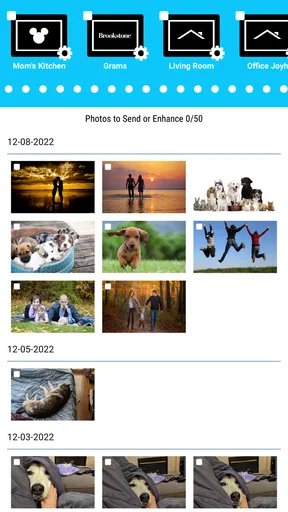
The first thing I noticed is that the app’s value appears at the moment I want to send a particular image rather than merely browse it. A family member can take a picture during the day, select it on a phone, and send it toward the frame at home. That creates a useful separation between the person holding the phone and the person looking at the display. The recipient does not need to be beside the photographer, and the photographer does not need to visit the room where the frame is placed.
A realistic example is a family frame in a living room. I might be away from home, take a picture at a birthday gathering, and use the app to send it to the frame for relatives to see later. The appeal is not advanced editing; it is the small feeling of being present through a shared household screen. This makes the app especially suitable for grandparents, families with children, or anyone who wants changing personal images in a common room without asking the person near the frame to manage every update.
The network is central to that experience. The phone needs a working connection when I want to send something, and the frame needs its own connection to receive the update. That means the app feels immediate when both sides are reachable, but less predictable when either side is temporarily unavailable. I would not treat it like a local cable transfer or a simple gallery viewer. It is a connected handoff, and the quality of that handoff shapes the whole experience.
That distinction matters when deciding whether this app is right for you. A conventional digital frame loaded directly from a memory card may be less convenient for remote sharing, but it does not depend on the same kind of phone-to-frame communication. A cloud photo album may be better for storing and organizing a large personal library, while this app is more focused on getting selected images onto a dedicated household display.
What I would prepare before sending the first photo
I recommend treating setup as a two-part process rather than blaming the app if the first transfer feels slow. The phone and the PhotoShare Frame both need to be ready to communicate, and the frame’s placement can affect whether it stays reliably reachable. Before sending a meaningful family picture, I would test with an ordinary image and confirm that the frame receives it. That simple check avoids discovering a connection problem when you are trying to share an important moment.
Worth Reading Before You Choose

EA SPORTS FC Mobile 26 Is a Bigger Football Game, but It Takes Time

Flipboard Shows What News Apps Must Do Beyond the Feed

Switching to Android Auto Means Rethinking Your Driving Routine

Google Calendar Makes a Crowded Week Easier to Manage

Ludo King Makes the Most of the Minutes Between Plans

Baby Panda World Brings Quick Play to Modern Phones, but Its Game Library Feels Busy
I would also decide who is supposed to control the frame. In a shared household, several people may want to send photos, but an unmanaged stream can become confusing. A small family agreement helps: one person can handle routine updates, while others send only special images. This is not a feature claim about the app; it is a practical way to keep a connected display pleasant rather than turning it into an unfiltered inbox.
The developer is SimplySmart Home by Switchmate, and the product’s focus is clear from the way the app supports a specific home device rather than trying to cover every type of smart-home hardware. That specialization is a strength for existing owners. It also means I would not install it first and hope it becomes useful without the matching frame. The app’s purpose is tied closely to that hardware relationship.
Using it from a phone while moving through the day
The strongest mobile use case is spontaneous sharing. My phone is already where new photos appear, so sending one from there is more natural than transferring it to a computer, preparing removable storage, and then updating a frame manually. This is especially handy when I am away from home and want the display to reflect something that happened recently.
There is a trade-off, though. A phone is often used in imperfect conditions: weak mobile reception, crowded Wi-Fi, low battery, or a quick moment between other tasks. I would avoid treating a send action as complete until I have a reasonable indication that the frame received the image. If I am in a hurry, I would send one picture first rather than selecting a large batch and assuming every item arrived correctly.
That one-at-a-time test is a useful workflow for travel. Suppose I am visiting relatives and want to share several photos with the frame back home. I would choose the most important image, send it, and check the result before continuing. If the connection becomes unreliable, I still know which picture mattered most. This is a more dependable habit than sending everything at once and sorting out missing images later.
The app also suits people who do not want to learn a complicated smart-home system. Its purpose is easy to explain: choose a photo and send it to the frame. For an older family member, that focused interaction may be more approachable than a broader platform filled with lighting controls, cameras, routines, and device dashboards. The frame itself remains part of the learning curve, but the app does not need to compete with unrelated controls.
Where connectivity can interrupt the pleasant part
Connected photo sharing has a particular weakness: a successful action on the phone is not the same thing as a visible result on the frame. The phone may be online while the frame is not, or the frame may be reachable while the phone’s current connection is unstable. In either case, the emotional promise of “send this now” can become “wait and check later.”
I found it helpful to separate three situations in my mind. The first is a normal delay, where the image appears after a short wait. The second is a failed transfer that needs another attempt. The third is a setup or network issue that will not be fixed by repeatedly tapping the send control. Recognizing that difference prevents unnecessary frustration and avoids creating duplicate attempts.
If a photo does not appear, my recovery routine is straightforward. I first check whether the phone can reach the internet normally, then I look at the frame rather than assuming the phone is the only problem. I would give the connection a moment, reopen the relevant screen if needed, and retry with a single image. If that still fails, I would verify the frame’s network situation and its placement before sending more photos. The important lesson is to diagnose the connection before treating repeated taps as a solution.
I would not use the app for a time-sensitive public display where every update must appear immediately. It is better suited to personal sharing, where a delay is inconvenient but not disastrous. For a birthday surprise, I would send the image well before the moment it needs to be seen. For a daily family update, a little uncertainty is easier to accept.
Keeping photo sharing manageable and data-conscious
Because the workflow begins with personal photos, I would be selective about what I send. A frame in a shared room is not the same as a private phone gallery. I would avoid sending images that contain sensitive documents, visible addresses, travel details, or people who have not agreed to appear on a household display. The app makes sharing convenient, so it is worth adding a moment of judgment before pressing send.
Connection awareness matters for data use as well. When I am on mobile data, I would prefer sending a small selection instead of treating the frame as a complete backup for my camera roll. A home Wi-Fi connection is the more sensible setting for routine transfers, especially when sharing several images. This approach also makes it easier to notice whether the frame is receiving updates normally, since both devices are operating in the environment where the display is expected to live.
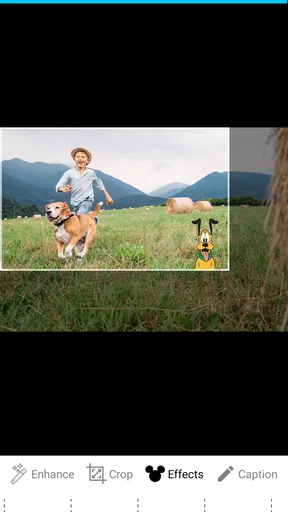
One practical tip is to prepare a small “frame-ready” selection in the phone’s photo library before opening the app. I can remove near-duplicates, blurry shots, screenshots, and pictures with awkward crops first. That reduces unnecessary transfers and improves the visual result without requiring the frame app to become an editing suite. The best experience comes from sending fewer, more intentional images rather than using the display as a dump for every new photo.
Another useful habit is to consider the room where the frame sits. A picture that looks fine on a phone may feel too busy when displayed larger and viewed from across a room. I would favor clear subjects and images with a simple composition. This is not a technical requirement of the app; it is a way to get more value from the hardware it serves. The app handles delivery, while the quality of the final display still depends on the choices I make before sending.
Who will appreciate it, and who should choose something else
I can recommend PhotoShare Frame v2 most confidently to people who already own the compatible PhotoShare Frame and want an uncomplicated way to keep its content fresh. It is also a good fit for families sharing pictures with a home where the frame is permanently placed. The remote aspect is the main reason to choose this kind of setup over manual transfers.
I would be more cautious if your priority is deep photo organization. Someone who wants albums, extensive search, editing tools, automatic backup, or a single library across many devices may be happier with a dedicated cloud gallery or the standard photo service already built into a phone. Those alternatives are designed around managing a collection. This app is designed around delivering selected photos to one particular display.
It may also be the wrong choice for a person who dislikes network-dependent devices. A traditional frame with local storage can be preferable if you want a predictable, self-contained routine and do not care about sending images from outside the home. Likewise, if your household changes photos only a few times a year, manual loading may be enough and the connected workflow may not justify buying into a specialized frame ecosystem.
The app’s audience is broad in one important respect: its content rating is Everyone, so it is positioned as a family-friendly home utility rather than an adult-oriented service. It is free to install, which lowers the barrier to trying it when the matching frame is already available. Still, “free” does not make it a complete replacement for the hardware. The useful question is not whether the app costs anything to download, but whether its connected sharing solves a real problem in your home.
What the current app profile suggests about maturity
The app has an average rating of 4.8 from around 3.9 thousand ratings, with roughly 1.5 thousand written reviews. It has passed 100 thousand installs, which gives me some confidence that it is not an obscure experiment with no established audience. Those figures are encouraging, but they do not remove the need to judge the actual workflow: a high rating can reflect satisfaction among existing frame owners, while someone without the hardware may find little reason to use it.
The listed release date is June 13, 2022, and the current version is 4.0.15. It supports Android 5.1 and later, making the stated compatibility relatively accommodating for older Android phones. That is useful in a family setting where not everyone upgrades devices regularly. At the same time, older operating systems can behave differently around connectivity and permissions, so I would keep the phone’s system software and the app reasonably current when possible.
I would not read the version number as a promise that every connection issue disappears. Updates can improve an app, but the experience still involves the phone, the frame, the home network, and sometimes a remote network. The most important sign of quality for this product is not a flashy interface; it is whether sending a carefully chosen photo remains understandable when the connection is imperfect.
My verdict on a frame that depends on being reachable
After using it, I see PhotoShare Frame v2 as a focused companion for a connected family display. Its best moment is simple: I have a photo on my phone, someone at home has the frame, and I can move the image between those two places without handling storage cards or asking another person to perform the update. That is a genuine convenience, especially for families separated by distance.
Its limitations come from the same design. The experience is not independent of connectivity, and a phone confirmation should not be confused with instant visibility on the frame. I would build in a little time for important shares, send smaller batches when the connection is uncertain, and use home Wi-Fi for regular updates where practical. Those habits turn a potentially fragile workflow into a manageable one.
My recommendation is positive for existing PhotoShare Frame owners, but conditional for everyone else. If you want a dedicated display that can receive personal photos from a phone, this app provides a clear and approachable route. If you want a full photo library, powerful editing, or a system that remains entirely separate from network conditions, a conventional gallery or locally loaded frame will suit you better. For the right household, though, the app makes the frame feel less like a static object and more like a small, shared window into everyday life.
The name PhotoShare Frame v2 accurately reflects that focused role. I would install it when the frame is already part of my home setup, keep my selections intentional, and treat connection checks as part of the routine rather than an annoyance. Used that way, it does not need a long feature list to be worthwhile: it simply makes the distance between a phone photo and a family display feel shorter.
Pros
- Simple way to display photos on a compatible digital frame.
- Supports sharing images remotely with family members.
- Useful for keeping a shared family photo collection updated.
- Clean interface makes basic photo management easy.
- Can reduce the need to transfer photos manually via USB.
Cons
- Requires a compatible PhotoShare frame to be useful.
- Some features may depend on an active internet connection.
- Photo organization options may feel limited for large libraries.
- Remote uploads can be delayed by weak Wi-Fi or server issues.
- Privacy settings should be checked before sharing personal photos.
FAQs for PhotoShare Frame v2
What is PhotoShare Frame v2 and what can it do?
PhotoShare Frame v2 is a digital photo-frame application designed to display and share pictures on compatible devices. It allows users to send selected photos to a connected frame, organize images for viewing, and refresh the display remotely. The app is mainly intended for families, homes, offices, and other spaces where users want an easy way to keep personal photos visible without printing them.
Is PhotoShare Frame v2 easy to set up for first-time users?
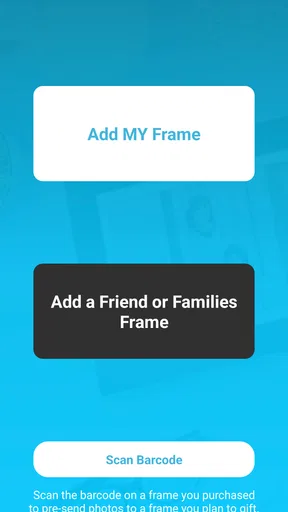
The setup process is generally straightforward, although it may require a few permissions and connection steps. After installing the app, users typically need to create or access an account, connect the compatible PhotoShare frame, and follow the on-screen instructions. A stable Wi-Fi connection is important, and the frame should remain powered on while pairing. Users unfamiliar with connected devices may need a few minutes to complete the process.
Can I send photos to a PhotoShare frame from anywhere?
PhotoShare Frame v2 is designed to let authorized users share photos with a compatible frame remotely, provided both the mobile device and frame have internet access. This is particularly useful for sending pictures to relatives or another household. However, remote sharing depends on the frame model, account configuration, server availability, and network quality. The app should not be treated as a guaranteed offline transfer tool.
What photo formats and image limitations should I know about?
Before downloading PhotoShare Frame v2, users should understand that supported photo formats, file sizes, image resolution, and storage limits may depend on the connected frame and the app version. Common formats such as standard JPEG images are usually the safest choice. Very large files, unusual formats, or heavily edited images may take longer to upload or may not display correctly, so keeping images reasonably sized is recommended.
Is PhotoShare Frame v2 free, private, and safe to use?
PhotoShare Frame v2 may be available to download without an upfront charge, but some features or connected hardware can involve separate costs. Because photos are uploaded and shared through an account-based service, users should review the app’s privacy policy, permissions, and sharing controls before using it. Only trusted recipients should be granted access, and account credentials should be protected with a strong, unique password.


